Published on Aug 21, 2025
Infrastructure on a budget
Many startups pour massive amounts of money into building highly resilient infrastructure from day one. I find it funny how so much energy is often poured into infrastructure, yet code quality often gets neglected.
My take on infrastructure: start lean, measure usage, then upgrade only when data shows a bigger setup is required.
For the past 8 years, I’ve been running a volunteer shifts app with over 30,000 MAU on a single shared vCPU instance costing just $24 a month. No AWS or k8s involved. It runs every service the app needs, except email, and requires very little maintenance. Despite its simplicity, it can handle around 50 requests per second.
The app
The app itself is built with Python, using FastAPI at its core. It exposes a REST API, connects to a PostgreSQL database, caches data in Redis, and runs background jobs with Huey. The same Python app serves a React app.
Gunicorn is the HTTP server, with uvicorn workers, 6 of them handle all the traffic.
The virtual machine
Over the years, I experimented with different providers and eventually settled on Vultr. To my surprise, it proved far more reliable than DigitalOcean, consistently keeping its 100% SLA.
I deployed what Vultr calls a High Performance Cloud Compute instance: 2 shared AMD EPYC vCPUs, 4 GB of memory, and 100 GB of storage. Here’s an overview of the machine’s usage:
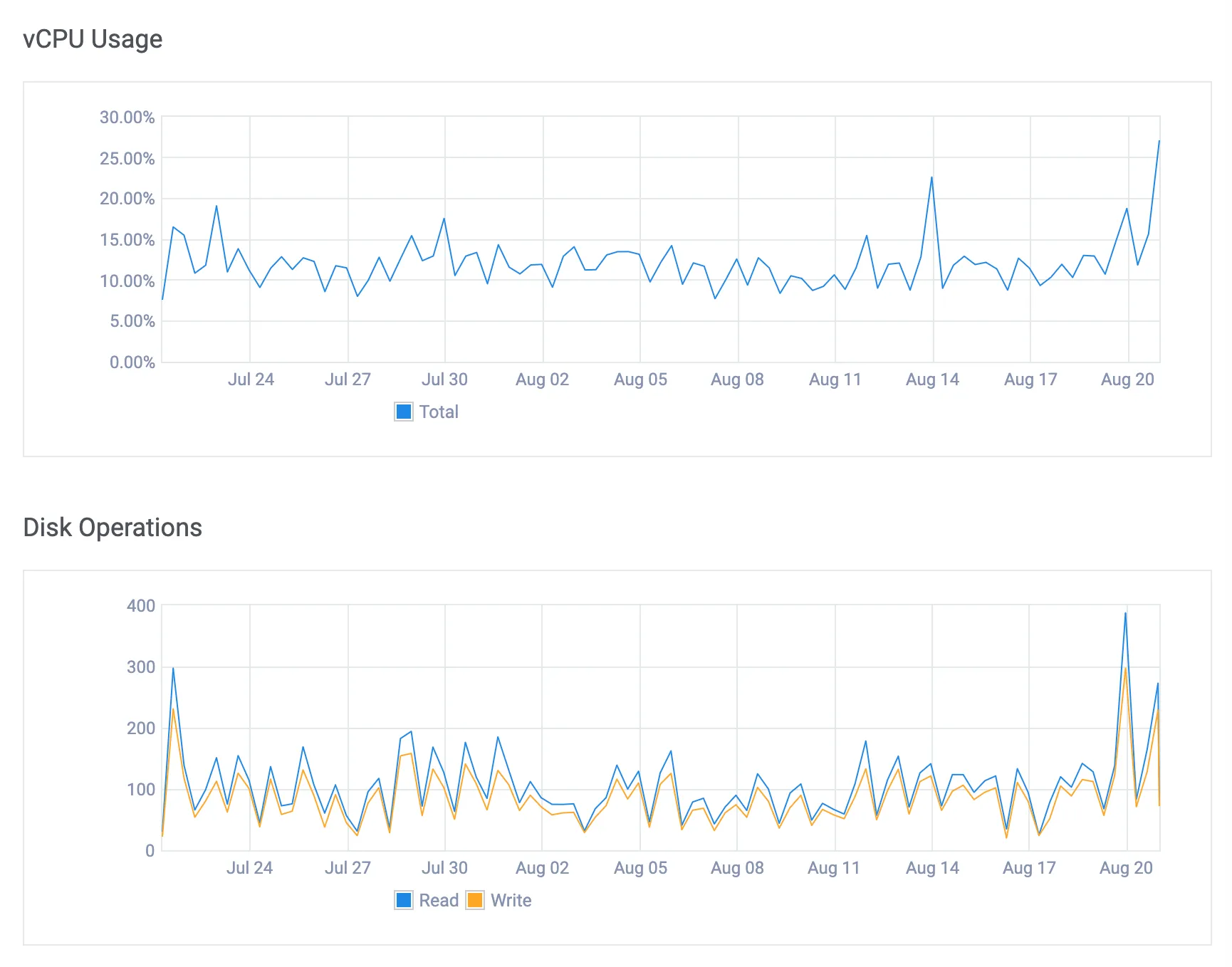
The usual load is 30 requests a minute. Python apps of this kind can be more memory-intensive than CPU-intensive.
The PaaS
I’ve always loved the simplicity of Heroku. It lets you forget about infrastructure almost entirely. Unfortunately, for this project, Heroku was far too expensive. We were working with a very limited budget, and every dollar mattered.
The solution? Dokku, an open-source alternative to Heroku. Some of its features:
- It’s powered by Docker
- Uses nginx as the reverse-proxy by default
- Ships with Vector for log management
- Provides an API very similar to Heroku’s
- There’s a rich ecosystem of plugins available
- You can deploy any
Dockerfile
Here you’ll find the gist of the setup required
for this server. Add a remote to your git repo and you are ready to deploy with just git push!
Check the Dokku ACL plugin if you need to manage users and their permissions. On the other hand, the postgres and redis plugins allow you to schedule encrypted backups to S3.
Over the years, Dokku has introduced very few breaking changes, which makes maintaining it effortless.
A stress test
To evaluate the app’s performance under load, I ran a stress test on one of its REST endpoints. Each request cycle involves authenticating the current user, executing multiple queries against the PostgreSQL database, and serializing roughly 20KB of data.
The following table shows the response times in milliseconds of a sample of ~8,000 requests:
| req/sec | p50 | p90 | max |
|---|---|---|---|
| 50 | 483.01 | 696.818 | 1373.95 |
| 100 | 869.33 | 1587.8 | 3562.0 |
| 200 | 1983.95 | 3258.23 | 8347.38 |
It’s worth noting that the PostgreSQL database is small — every year we add about 100 MB of data. But that’s exactly the data that matters for the app and our users.
Load on the server at 100 requests/sec throughput
Next steps
Yes, there’s more work involved when configuring the server for the first time. You’ll want to disable root password login, enforce SSH key access for all users, configure the firewall, and so on.
You may also want to:
- Proxy the app behind Cloudflare
- Set up a CI/CD workflow to deploy on pull request merges
- Add OpenTelemetry for observability
Still, you can have a solid environment up and running in half a day — it usually takes me less than 2 hours to set up a new server and deploy an app to production using this workflow.
Final thoughts
Can you really rely on a single server? I’ve done it for the past few years, and I think you might be able to get away with it for a while, too. More often than not, it’s GDPR, not traffic, that forces to deploy a second server. Therefore, make sure your setup can be easily reproduced. A Docker-based workflow will give you the flexibility to migrate to k8s when —and if— needed.
Good architecture lets you defer decisions for as long as possible
Should you deploy your app and all its services on a single shared vCPU machine? Probably not. Still, I hope this demonstrates just how much you can accomplish with minimal resources.